商品详情页小球出不来
来源:18-5 商品详情页实现(5)
星垂平野阔
2017-04-01
商品详情页点击增加商品,小球出不来是什么原因?我对了老师github上的源码,是一样的
<transition name="move">
	<div v-show="showFlag" class="food" ref="food">
		<div class="food-content">
			<div class="image-header">
				<img :src="food.image" alt="food.name">
				<div class="back" @click="hide">
					<i class="icon-arrow_lift"></i>
				</div>
			</div>
			<div class="content">
				<h1 class="title">{{food.name}}</h1>
				<div class="detail">
					<span class="sell-count">月售{{food.sellCount}}份</span>
					<span class="rating">好评率{{food.rating}}%</span>
				</div>
				<div class="price">
					<span class="now">¥{{food.price}}</span><span class="old" v-show="food.oldPrice">¥{{food.oldPrice}}</span>
				</div>
			</div>
			<div class="cartcontrol-wrapper">
				<cartcontrol @add="addFood" :food="food"></cartcontrol>
			</div>
			<transition name="fade">
				<div @click.stop.prevent="addFirst" class="buy" v-show="!food.count || food.count===0">加入购物车</div>
			</transition>
		</div>
	</div>
</transition>
methods: {
show() {
this.showFlag = true;
this.$nextTick(() => {
if (!this.scroll) {
this.scroll = new BScroll(this.$refs.food, {
click: true
});
} else {
this.scroll.refresh();
}
});
},
hide() {
if (!event._constructed) {
return;
}
this.showFlag = false;
},
addFirst(food) {
if (!event._constructed) {
return;
}
this.$emit('add', event.target);
Vue.set(this.food, 'count', 1);
},
addFood(target) {
this.$emit('add', event.target);
}
},
components: {
cartcontrol
}写回答
7回答
-

ustbhuangyi
2017-04-27
最后一行的 z-index 改成 -1 试试
00 -
ustbhuangyi
2017-04-01
food.vue 的 css 部分也贴一下吧
00 -

天5
2017-07-10
解决了 你去 <food @add="addFood" :food="selectedFood" ref="food"></food>
good组件加上 @add20 -

丶More
2017-05-23
兄弟,解决了么?我也碰到这个问题,对比了github,还是没解决
00 -

我就是那个胖子
2017-05-16
food.vue里面 需要绑定 <cartcontrol @add="addFood" :food="food"> </cartcontrol>
022017-06-06 -
星垂平野阔
提问者
2017-04-28
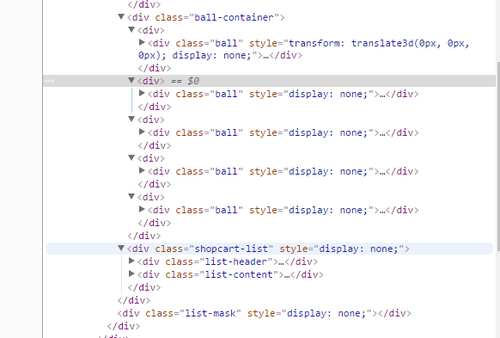
老师 我z-index改成-1还是不行 小球在其他地方都是可以出来的 就是在商品详情页出不来 我在商品详情页增加一个这里ball不会变化 我在想是不是food.vue里面少写了什么 但是我对了你的源码是一样的 不晓得为什么
012017-05-12 -
星垂平野阔
提问者
2017-04-27
.food
		position: fixed
		top: 0
		left: 0
		bottom: 48px
		z-index: 30
		width: 100%
		background: #fff
		transform: translate3d(0,0,0)
		&.move-enter-active, &.move-leave-active
			transition: all 0.2s linear
		&.move-enter, &.move-leave-active
			transform: translate3d(100%,0,0)
		.image-header
			position: relative
			width: 100%
			height: 0
			padding-top: 100%
			img
				position: absolute
				top: 0
				left: 0;
				width: 100%
				height: 100%
			.back
				position: absolute
				top: 10px
				left: 0
				.icon-arrow_lift
					display: block
					padding: 10px
					font-size: 20px
					color: #fff
		.content
			position: relative
			padding: 18px
			.title
				line-height: 14px
				margin-bottom: 8px
				font-size: 14px
				font-weight: 700
				color: rgb(7,17,27)
			.detail
				line-height: 10px
				height: 10px
				margin-bottom: 18px
				font-size: 0
				.sell-count, .rating
					font-size: 10px
					color: rgb(147,153,159)
				.sell-count
					margin-right: 12px
			.price
				font-weight: 700
				line-height: 24px
				.now
					line-height: 24px
					color: rgb(240,20,20)
					font-weight: 700
					margin-right: 8px
				.old
					font-size: 10px
					color: rgb(143,153,159)
					text-decoration: line-through
		.cartcontrol-wrapper
			position: absolute
			right: 12px
			bottom: 12px
		.buy
			position: absolute
			right: 18px
			bottom: 18px
			z-index: 10
			height: 24px
			line-height: 24px
			padding: 0 12px
			box-sizing: border-box
			background: rgb(0,160,220)
			border-radius: 12px
			font-size: 10px
			color: #fff
			opacity: 1
			&.fade-enter-active, &.fade-leave-active
				transition: all 0.2s
			&.fade-enter, &.fade-leave-active
				opacity: 0
				z-index: 1
老师 这是我food.vue里的css样式
00
相似问题