点击登录之后,即使验证通过,页面仍然跳转登录页面??
来源:8-1 登录第一部分 获取token

weixin_慕先生7015352
2021-01-14
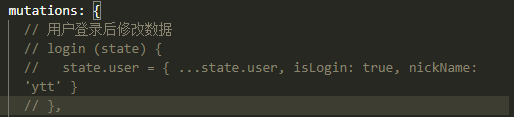
之前的这种方式能够跳转成功,但是改写在actions 里之后就不行了,请老师帮忙看一下。
—login.vue----
登录到者也
—store.ts—
import { createStore, Commit } from 'vuex’
import axios from ‘axios’
// 用户信息数据
export interface UserProps {
isLogin: boolean;
nickName?: string;
_id?: string;
column?: string;
email?: string;
avatar?: ImageProps;
description?: string;
}
// 专栏列表数据
export interface ColumnProps {
_id: string;
title: string;
avatar?: ImageProps;
description: string;
}
// 文章列表数据
export interface PostProps {
_id?: string;
title: string;
excerpt?: string;
content?: string;
image?: ImageProps;
createdAt?: string;
column: string;
author?: string;
}
// 全局数据类型
export interface GlobalDataProps {
token: string;
loading: boolean;
columns: ColumnProps[];
posts: PostProps[];
user: UserProps;
}
// 专栏图片数据类型
interface ImageProps {
_id?: string;
url?: string;
createAt?: string;
}
// 提取async await 的公共函数
const getAndCommit = async (url: string, mutationName: string, commit: Commit) => {
const { data } = await axios.get(url)
commit(mutationName, data)
}
// 创建和发送请求
const postAndCommit = async (url: string, mutationName: string, commit: Commit, payload: any) => {
const { data } = await axios.post(url, payload)
commit(mutationName, data)
return data
}
const store = createStore({
state: {
token: ‘’,
loading: false,
columns: [],
posts: [],
user: { isLogin: false, nickName: ‘ytt’, column: ‘1’ }
},
mutations: {
// 用户登录后修改数据
// login (state) {
// state.user = { …state.user, isLogin: true, nickName: ‘ytt’ }
// },
// 新建文章(添加到对应的作者文章列表上)
createPost (state, newPost) {
state.posts.push(newPost)
},
// 将专栏列表的假数据替换成真实后端数据
fetchColumns (state, rawData) {
state.columns = rawData.data.list
},
// 替换单个专栏的数据
fetchColumn (state, rawData) {
state.columns = [rawData.data]
},
// 替换某个专栏的文章列表
fetchPosts (state, rawData) {
state.posts = rawData.data.list
},
// 设置loading 状态
setLoading (state, status) {
state.loading = status
},
login (state, rawData) {
state.token = rawData.data.token
}
},
actions: {
// 获取专栏列表
// fetchColumns (context) {
// axios.get(’/columns’).then(resp => {
// context.commit(‘fetchColumns’, resp.data)
// })
// },
// async fetchColumns ({ commit }) {
// const { data } = await axios.get(’/columns’)
// commit(‘fetchColumns’, data)
// },
fetchColumns ({ commit }) {
getAndCommit(’/columns’, ‘fetchColumns’, commit)
},
// 获取单个专栏
// fetchColumn ({ commit }, cid) {
// axios.get(/columns/${cid}).then(resp => {
// commit(‘fetchColumn’, resp.data)
// })
// },
// async fetchColumn ({ commit }, cid) {
// const { data } = await axios.get(/columns/${cid})
// commit(‘fetchColumn’, data)
// },
fetchColumn ({ commit }, cid) {
getAndCommit(/columns/${cid}, ‘fetchColumn’, commit)
},
// 获取单个专栏的文章
// fetchPosts ({ commit }, cid) {
// axios.get(/columns/${cid}/posts).then(resp => {
// commit(‘fetchPosts’, resp.data)
// })
// }
// async fetchPosts ({ commit }, cid) {
// const { data } = await axios.get(/columns/${cid}/posts)
// commit(‘fetchPosts’, data)
// }
fetchPosts ({ commit }, cid) {
getAndCommit(/columns/${cid}/posts, ‘fetchPosts’, commit)
},
// 用户登录时,发送请求
login ({ commit }, payload) {
return postAndCommit(’/user/login’, ‘login’, commit, payload)
}
},
getters: {
getColumnById: (state) => (id: string) => {
return state.columns.find(c => c._id === id)
},
getPostsByCid: (state) => (cid: string) => {
return state.posts.filter(post => post.column === cid)
}
}
})
export default store
2回答
-
同学你好 请问你是说登录以后权限验证的问题吗?请耐心的往下看,我们在 8-4 小节会解决这个问题的,这就是我们渐进式的开发方式 谢谢
032021-01-18 -

张轩
2021-01-15
同学你好 看这样的代码片段比较难懂 请提供一下你的源代码 git ,我在本地帮你调试一下
012021-01-15
相似问题